Tuesday, January 28, 2014

Export table data in Excel - Salesforce

Here is the easiest way to export table data which is displayed in VF page in excel file.

AccountData.page : VF page which is displaying Accounts data

<apex:page controller="AccountData">
    <apex:form >
        <apex:pageBlock >
            <apex:pageBlockTable value="{!accList}" var="acc">
                <apex:column value="{!acc.Name}"/>
    <apex:column value="{!acc.Type}"/>
    <apex:column value="{!acc.Industry}"/> 
   </apex:pageBlockTable>
        </apex:pageBlock>
    <apex:commandButton value="Export" action="/apex/AccountDataExport"/ >
 </apex:form>
</apex:page>

AccountDataExport.page : VF page which is exporting Accounts data in Excel

Add ContentType attribute in apex page tag and set its value to application/vnd.ms-excel. Here in given example
AccountData.xls is the name of the file.

contentType="application/vnd.ms-excel#AccountData.xls"


<apex:page controller="AccountData" contentType="application/vnd.ms-excel#AccountData.xls">
    <apex:form >
        <apex:pageBlock >
            <apex:pageBlockTable value="{!accList}" var="acc">
                <apex:column value="{!acc.Name}"/>
            </apex:pageBlockTable>
        </apex:pageBlock>
    </apex:form>
</apex:page>

AccountData.cls :

public class AccountData{
    public List<Account> accList{get;set;}
    public AccountData(){
        accList = [Select Name,Type,Industry from Account limit 1000];
    }
}

Different ways to run Schedule class

To invoke Apex classes to run at specific times we are creating schedule class. 3 different ways are there to run Schedule class. Depends on the requirement we can decide which is the best way to call schedule class.

  1. Schedule Apex - UI based Standard way of salesforce
  2. Run Schedule class from developer console
  3. Call Schedule class from Trigger
Schedule class

global with sharing class ScheduleClass implements Schedulable {
    global void execute(SchedulableContext sc) {
        //Code which will run when schedule class runs 
    }
}

Schedule Apex - UI based Standard way of salesforce

Using salesforce standard feature, we can run Schedule class at specific time. Steps to schedule class.
  • Go to Setup > Build > Develop > Apex Classes
  • Click on 'Schedule Apex' button(refer below snap)


Run Schedule class from developer console

Many times situation occurs, when we wants to run schedule class immediately. Testing is one of them example where we want to run Schedule class immediately.

To run schedule class from Developer Console below follow steps.

  • Go to Developer Console > Open Execute Anonymous Window
  • Add bellow code and run

ScheduleClass temp = new ScheduleClass(); // ScheduleClass - Class which you want to Schedule
String sch = '0 10 23 * * ?'; // "0 10 23 * * ?" - "Seconds Minutes Hours Day_of_month Month Day_of_week optional_year" in order
system.schedule('ScheduleClass', sch, temp);
For more details visit salesforce site :  
http://www.salesforce.com/us/developer/docs/apexcode/Content/apex_System_System_schedule.htm


Call Schedule class from Trigger

We can call Schedule class the same way we are calling from Developer Console directly in trigger also. Refer bellow code.

trigger AccountOwnerChange on Account (before insert) {
    if(trigger.isInsert){
        ScheduleClass temp = new ScheduleClass();
        String sch = '0 10 23 * * ?'; //
        system.schedule('ScheduleClass', sch, temp);
    }
}

Wednesday, December 11, 2013

Assign/Remove Permission set to multiple users on single click

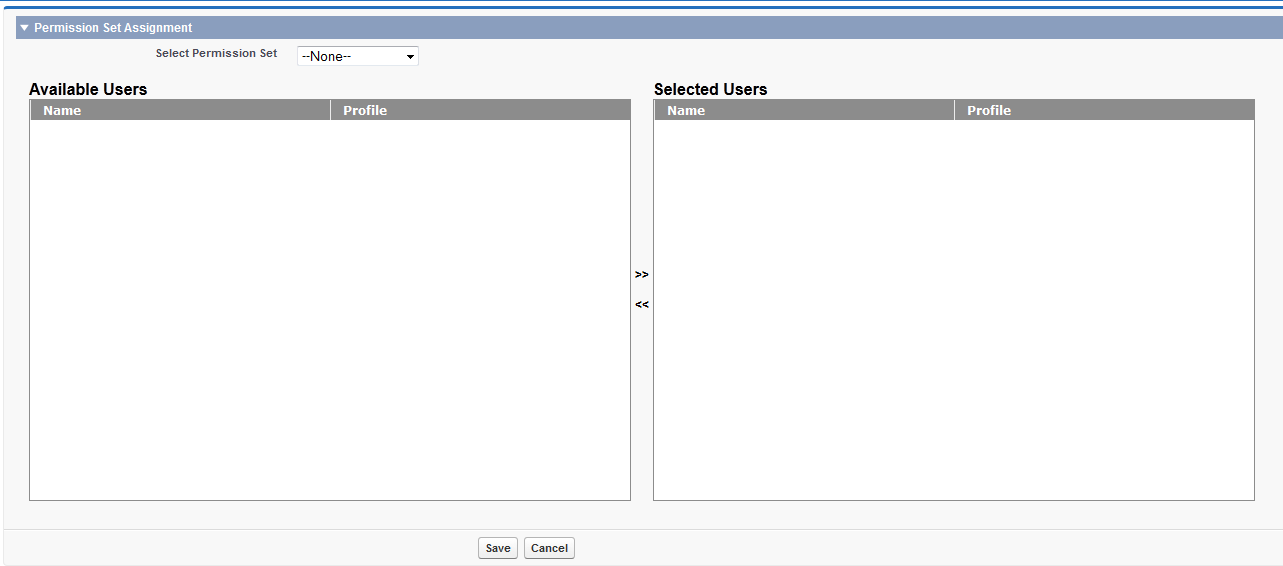
Currently in Salesforce if you want to assign Permission Set to multiple users, you have to go to each user and you have to assign. Using this page you can Assign/Remove Permission Set to multiple users on single click, which will save your time.

Permission Set assignment depends on the user License and Permission set License. If both are same, then only you can assign Permission Set to User. So, this page will list out only those users who have same license as permission set.

If you assign a permission set with no associated user license, all of its enabled settings and permissions must be allowed by the user’s license, or the assignment will fail.

In this page I am generating user table using JQuery and JSON. Because it will solve the problem of Salesforce Government limit of 1000 records in a list. User table can list out more records.


Page : AssignPermissionSet


<apex:page controller="AssignPermissionSetController" tabStyle="Account">
    <apex:includeScript value="https://ajax.googleapis.com/ajax/libs/jquery/1.10.1/jquery.min.js"/>
    <apex:includeScript value="{!URLFOR($Resource.jquery)}" />
    <style>
        #ProcessDiv{
            display: none;
            position: fixed;
            top: 0%;
            left: 0%;
            width: 100%;
            height: 100%;
            background-color: #ffffff;
            z-index:1;
            opacity:0.5;
            text-align: center;
            vertical-align:50%;
            ProcessDiv: alpha(opacity=50);
        }
        
        
        .datagrid table {
            border-collapse: collapse;
            text-align: left;
            width: 600px;
        }
        
        .datagrid {
            font: normal 12px/150% Verdana, Arial, Helvetica, sans-serif;
            background: #fff;
            overflow: hidden;
            border: 1px solid #8C8C8C;
            width: 600px;
        }
        .header{
            background-color:#8C8C8C;
            color:#FFFFFF;
            font-size: 12px;
            padding: 1px 12px;
            font-weight: bold;
            border-left: 1px solid #A3A3A3;
            width: 300px;
        }
        .cell{
            color: #7D7D7D;
            border-left: 1px solid #DBDBDB;
            font-size: 12px;
            font-weight: normal;
            padding: 1px 12px;
            width: 300px;
        }
        
        .selected{
            background-color:#E3F3FF;
            cursor:pointer;
        }
    </style>
    <script>
        var jsonString;
        var removedTbl;
        var addedTbl;
        var row;
        var tr = [];
        var headerAPI = [];
        var td;
        var rowCnt;
        var jsonObj;
        function showJSONData(jsonString1,jsonString2){
            generateTbl();
            jsonObj = jQuery.parseJSON(jsonString1);
            rowCnt = new Number(jsonObj.total);
            for (var i = 0; i < rowCnt; i++) {
                row = $('<tr></tr>').attr('id',jsonObj.rows[i].Id).appendTo(removedTbl);
                row.bind( "click", function() {
                    $(this).toggleClass('selected');
                });
                td = $('<td></td>').addClass('cell').text(jsonObj.rows[i].Name).appendTo(row);
                td = $('<td></td>').addClass('cell').text(jsonObj.rows[i].Profile).appendTo(row);    
            } 
            
            jsonObj = jQuery.parseJSON(jsonString2);
            rowCnt = new Number(jsonObj.total);
            tr = [];
            headerAPI = [];
            for (var i = 0; i < rowCnt; i++) {
                row = $('<tr></tr>').attr('id',jsonObj.rows[i].Id).appendTo(addedTbl);
                row.bind( "click", function() {
                    $(this).toggleClass('selected');
                });
                td = $('<td></td>').addClass('cell').text(jsonObj.rows[i].Name).appendTo(row);
                td = $('<td></td>').addClass('cell').text(jsonObj.rows[i].Profile).appendTo(row);
            }           
            console.log("TTTTT:"+$('#assignedUserRds').html());
        }
        
        function generateTbl(){
            $('#RemovedUserRds').empty();
            $('#AssignedUserRds').empty();
            //Removed user Data Table
            removedTbl = $('<table></table>').attr('id',"removedTbl");
            row = $('<tr></tr>').appendTo(removedTbl);
            td = $('<th></th>').addClass('header').text('Name').appendTo(row);
            td = $('<th></th>').addClass('header').text('Profile').appendTo(row);
            removedTbl.appendTo($('#RemovedUserRds'));
            
            //Added user Data Table
            addedTbl = $('<table></table>').attr('id',"addedTbl");
            row = $('<tr></tr>').appendTo(addedTbl);
            td = $('<th></th>').addClass('header').text('Name').appendTo(row);
            td = $('<th></th>').addClass('header').text('Profile').appendTo(row);
            addedTbl.appendTo($('#AssignedUserRds'));
        }
        
        $(document).ready(function() {
            generateTbl();
        });
        
        function startProcess(){
            document.getElementById('ProcessDiv').style.display = 'block'; 
        }
        function endProcess(){
            document.getElementById('ProcessDiv').style.display = 'none'; 
        }
        
        function moveRow(tblId){
            if(tblId == 'AssignedUserRds'){
                tr = $('#RemovedUserRds table tr[class="selected"]').appendTo($('#' + tblId + ' table'));
            }else{
                tr = $('#AssignedUserRds table tr[class="selected"]').appendTo($('#' + tblId + ' table'));
            }
        }
        function getUserIds(){
            var addUserIds = '';
            $('#AssignedUserRds table tr').each(function() {
                if($(this).attr('id') != ''){
                    addUserIds = addUserIds + ',' + $(this).attr('id');
                }
            });            
            Save(addUserIds);         
        }
    </script>
    <apex:form >
        <div id="ProcessDiv"><b>Saving records.........</b></div>
        <apex:messages id="errorMsgId"/>
        <apex:actionFunction name="fetchUserRds" action="{!fetchUserRds}" oncomplete="showJSONData('{!removedUserRds}','{!assignedUserRds}');endProcess();" />
        <apex:actionFunction name="Save" action="{!Save}" oncomplete="showJSONData('{!removedUserRds}','{!assignedUserRds}');endProcess();" reRender="errorMsgId">
            <apex:param assignTo="{!addUserIds}" value="{!addUserIds}" name="addUserIds"/>
        </apex:actionFunction>
        <apex:pageBlock >
            <apex:pageBlockSection columns="1" title="Permission Set Assignment">
                <apex:selectList value="{!permissionSetId}" label="Select Permission Set" onchange="startProcess();fetchUserRds();" multiselect="false" size="1">
                    <apex:selectOptions value="{!options}"/>
                </apex:selectList>
            </apex:pageBlockSection>
            <apex:pageBlockSection columns="1" id="pgSectionBlock">
                <apex:outputPanel >
                <table width="700px" height="400px;">
                    <tr>
                        <td style="width:300px;">
                            <apex:outputText value="Available Users" style="font-weight:bold; font-size:16px;"/>
                            <div id="RemovedUserRds" class="datagrid" style="height:400px;overflow:auto;background-color:white;">
                            </div>
                        </td>
                        <td style="width:100px;text-align:center;vertical-align:middle">
                            <div onClick="moveRow('AssignedUserRds');" style="cursor:pointer;border:1px">
                                <b>&gt;&gt;</b>
                            </div>
                            <br/>
                            <div onClick="moveRow('RemovedUserRds');" style="cursor:pointer;border:1px">
                                <b>&lt;&lt;</b>
                            </div>
                        </td>
                        <td style="width:300px;">
                            <apex:outputText value="Selected Users" style="font-weight:bold; font-size:16px;"/>
                            <div id="AssignedUserRds" class="datagrid" style="height:400px; overflow:auto; background-color:white;">
                            </div>
                        </td>
                    </tr>
                </table>
                </apex:outputPanel>
            </apex:pageBlockSection>
            <apex:pageBlockButtons location="bottom">
                <apex:commandButton onClick="startProcess();getUserIds();" reRender="errorMsgId" value="Save"/>
                <apex:commandButton onClick="window.open('/005','_self');" reRender="errorMsgId" value="Cancel"/>
            </apex:pageBlockButtons>
        </apex:pageBlock>
    </apex:form>
</apex:page>

Class : AssignPermissionSetController


public class AssignPermissionSetController{
    public String removeUserIds { get; set; }
    public String addUserIds { get; set; }
    public List<SelectOption> options{get;set;}
    public Id permissionSetId{get;set;}
  
    // Global JSON generator
    public static JSONGenerator gen{get; set;}
    public String assignedUserRds{get; set;}
    public String removedUserRds{get; set;}
  
    List<PermissionSetAssignment> insertList;
    List<PermissionSetAssignment> removeList;
    Map<Id,PermissionSetAssignment> userPermissionSetAssignmentMap;
  
    public AssignPermissionSetController(){
        options = new List<SelectOption>();
        options.add(new SelectOption('','--None--'));
        for(PermissionSet temp : [Select Id,Label,UserLicenseId from PermissionSet where  ProfileId = null]){
            options.add(new SelectOption(temp.Id,temp.Label));
        }
    }
  
    public void fetchUserRds(){
        addUserIds = '';
        removeUserIds = '';
        assignedUserRds = '';
        removedUserRds = '';
        userPermissionSetAssignmentMap = new Map<Id,PermissionSetAssignment>();
        if(permissionSetId != null){
            set<Id> userId = new set<Id>();
            for(PermissionSetAssignment Obj : [select Id,AssigneeId from PermissionSetAssignment where PermissionSetId =: permissionSetId]){
                userId.add(Obj.AssigneeId);
                userPermissionSetAssignmentMap.put(Obj.AssigneeId,Obj);
            }
          
            Integer cnt = 0;
            gen = JSON.createGenerator(true);  
            gen.writeStartObject();
            gen.writeFieldName('rows');
            gen.writeStartArray();
          
            PermissionSet tempObj = [Select UserLicenseId from PermissionSet where Id =: permissionSetId];
            List<Profile> tempProfilelList = new List<Profile>();
            if(tempObj.UserLicenseId != null){
                tempProfilelList = [select Id,(Select Id,Name,Profile.Name from users where Id not in : userId) from Profile where UserLicenseId =: tempObj.UserLicenseId];
            }else{
                tempProfilelList = [select Id,(Select Id,Name,Profile.Name from users where Id not in : userId) from Profile];
            }
            for(Profile profileObj : tempProfilelList){
                for(User ur : profileObj.users){
                    gen.writeStartObject();
                    gen.writeStringField('Id', ur.Id);
                    gen.writeStringField('Name', ur.Name);
                    gen.writeStringField('Profile', ur.Profile.Name);
                    gen.writeEndObject();
                    cnt++;
                }
            }
            gen.writeEndArray();
            gen.writeStringField('total',cnt + '');
            gen.writeEndObject();
            removedUserRds = gen.getAsString();

            cnt = 0;
            gen = JSON.createGenerator(true);  
            gen.writeStartObject();
            gen.writeFieldName('rows');
            gen.writeStartArray();
          
            for(User ur : [Select Id, Name,Profile.Name from User where Id in : userId]){
                gen.writeStartObject();
                gen.writeStringField('Id', ur.Id);
                gen.writeStringField('Name', ur.Name);
                gen.writeStringField('Profile', ur.Profile.Name);
                gen.writeEndObject();
                cnt++;
            }
            gen.writeEndArray();
            gen.writeStringField('total',cnt + '');
            gen.writeEndObject();
            assignedUserRds = gen.getAsString();
        }
    }

    public void save(){
        try{
            if(permissionSetId != null){
                insertList = new List<PermissionSetAssignment>();
                removeList = new List<PermissionSetAssignment>();
                PermissionSetAssignment temp;
                if(addUserIds != ''){
                    addUserIds = addUserIds.substring(1);
                    for(String str : addUserIds.split(',')){
                        if(!userPermissionSetAssignmentMap.containsKey((Id)str)){
                            temp = new PermissionSetAssignment();
                            temp.PermissionSetId = permissionSetId;
                            temp.AssigneeId = str;
                            insertList.add(temp);
                        }
                    }
                }
                for(String str : userPermissionSetAssignmentMap.keySet()){
                    if(!addUserIds.contains(str)){
                        removeList.add(userPermissionSetAssignmentMap.get(str));
                    }
                }
                if(insertList.size() > 0){
                    insert insertList;
                }
                if(removeList.size() > 0){
                    delete removeList;
                }
                fetchUserRds();
            }
        }catch(Exception ex){
            Apexpages.addMessage(new Apexpages.Message(Apexpages.Severity.INFO, 'Permission Set assignment failed.'));
        }
    }  
}

Thursday, December 5, 2013

Generate formatted Excel sheet in Salesforce

Sample:

Using Microsoft Office XML formats we can generate formatted excel sheet. For more detail refer below sites. Using schema provided by office, we can create formatted word document also.

http://en.wikipedia.org/wiki/Microsoft_Office_XML_formats
http://msdn.microsoft.com/en-us/library/aa140066(office.10).aspx

Page : FormattedExcel


<apex:page controller="ExcelXMLController" contentType="application/vnd.ms-excel#XYZ.xls">
    {!ExcelData}
    <c:excelgenerator></c:excelgenerator>
    {!EOF}
</apex:page>


Class : ExcelXMLController 


public class ExcelXMLController {

    public String getExcelData() {
        return '<?xml version="1.0"?><?mso-application progid="Excel.Sheet"?>';
    }
    public String getEOF() {
        return '</Workbook>';
    }

}


Component : ExcelGenerator


<apex:component controller="AccountData">
    <Workbook xmlns="urn:schemas-microsoft-com:office:spreadsheet"
     xmlns:o="urn:schemas-microsoft-com:office:office"
     xmlns:x="urn:schemas-microsoft-com:office:excel"
     xmlns:ss="urn:schemas-microsoft-com:office:spreadsheet"
     xmlns:html="http://www.w3.org/TR/REC-html40">
     <DocumentProperties xmlns="urn:schemas-microsoft-com:office:office">
      <Author>Ankurkumar Amratlal Patel</Author>
      <LastAuthor>Ankurkumar Amratlal Patel</LastAuthor>
      <Created>2013-12-06T05:12:53Z</Created>
      <Company>HP</Company>
      <Version>14.00</Version>
     </DocumentProperties>
     <ExcelWorkbook xmlns="urn:schemas-microsoft-com:office:excel">
      <WindowHeight>10035</WindowHeight>
      <WindowWidth>22995</WindowWidth>
      <WindowTopX>480</WindowTopX>
      <WindowTopY>120</WindowTopY>
      <ProtectStructure>False</ProtectStructure>
      <ProtectWindows>False</ProtectWindows>
     </ExcelWorkbook>
     <Styles>
      <Style ss:ID="Default" ss:Name="Normal">
       <Alignment ss:Vertical="Bottom"/>
       <Borders/>
       <Font ss:FontName="Calibri" x:Family="Swiss" ss:Size="11" ss:Color="#000000"/>
       <Interior/>
       <NumberFormat/>
       <Protection/>
      </Style>
      <Style ss:ID="s70">
       <Alignment ss:Horizontal="Center" ss:WrapText="1" ss:Vertical="Bottom"/>
       <Font ss:FontName="Calibri" x:Family="Swiss" ss:Size="11" ss:Color="#FF0000"
        ss:Bold="1"/>
      </Style>
     </Styles>
     <Worksheet ss:Name="Sheet1">
      <Names>
       <NamedRange ss:Name="_FilterDatabase" ss:RefersTo="=Sheet1!R1C1:R1C3"
        ss:Hidden="1"/>
      </Names>
      <Table ss:ExpandedColumnCount="3" ss:ExpandedRowCount="{!excelRowCnt}" x:FullColumns="1"
       x:FullRows="1" ss:DefaultRowHeight="15">
       <Column ss:Index="2" ss:Width="102"/>
       <Row>
        <Cell ss:StyleID="s70"><Data ss:Type="String">Account Name</Data><NamedCell ss:Name="_FilterDatabase"/></Cell>
        <Cell ss:StyleID="s70"><Data ss:Type="String">Type</Data><NamedCell ss:Name="_FilterDatabase"/></Cell>
        <Cell ss:StyleID="s70"><Data ss:Type="String">SLA</Data><NamedCell
          ss:Name="_FilterDatabase"/></Cell>
       </Row>
       <apex:repeat value="{!accList}" var="acc">
           <Row>
            <Cell><Data ss:Type="String">{!acc.Name}</Data></Cell>
            <Cell><Data ss:Type="String">{!acc.Type}</Data></Cell>
            <Cell><Data ss:Type="String">{!acc.SLA__c}</Data></Cell>
           </Row>
       </apex:repeat>
      </Table>
      <WorksheetOptions xmlns="urn:schemas-microsoft-com:office:excel">
       <PageSetup>
        <Header x:Margin="0.3"/>
        <Footer x:Margin="0.3"/>
        <PageMargins x:Bottom="0.75" x:Left="0.7" x:Right="0.7" x:Top="0.75"/>
       </PageSetup>
       <Print>
        <ValidPrinterInfo/>
        <HorizontalResolution>600</HorizontalResolution>
        <VerticalResolution>600</VerticalResolution>
       </Print>
       <Selected/>
       <Panes>
        <Pane>
         <Number>3</Number>
         <ActiveRow>7</ActiveRow>
         <ActiveCol>9</ActiveCol>
        </Pane>
       </Panes>
       <ProtectObjects>False</ProtectObjects>
       <ProtectScenarios>False</ProtectScenarios>
      </WorksheetOptions>
      <AutoFilter x:Range="R1C1:R1C3" xmlns="urn:schemas-microsoft-com:office:excel">
      </AutoFilter>
     </Worksheet>
    </Workbook>
</apex:component>


Class : AccountData


public class AccountData{
    public List<Account> accList{get;set;}
    public Integer excelRowCnt {get;set;}
    public AccountData(){
        accList = [Select Name,Type,SLA__c from Account];
        excelRowCnt = 4 + accList.size();
    }
}